
Wicked Good Books
Concept project, Local bookstore in Salem, MA
What
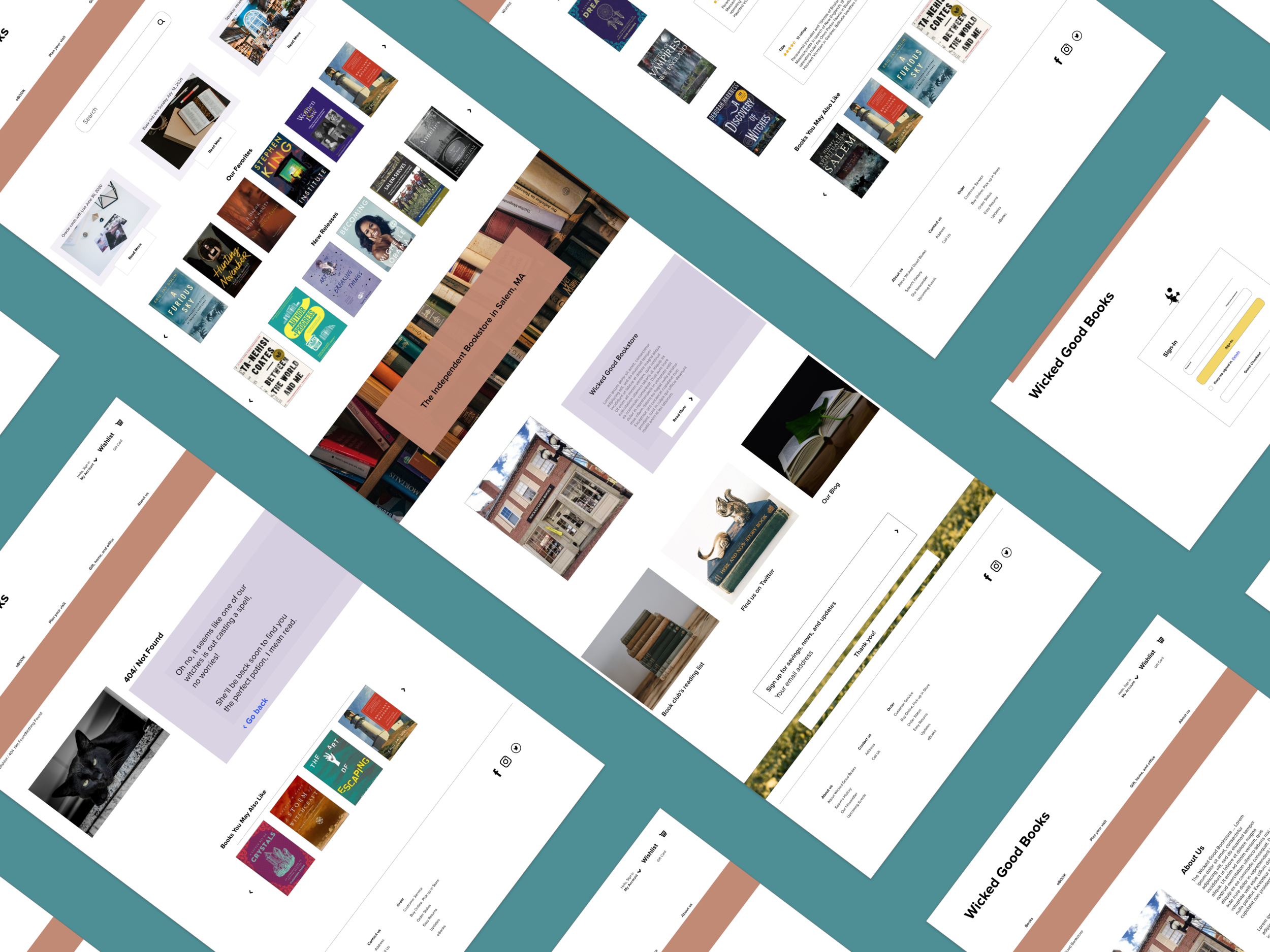
The goal of this project was to revamp a local bookstore's website into a more modern and better structured site. Research and information architecture, such as sitemaps, content inventory, and task analysis, were used to learn how the site functioned well and how it could be improved. At the end of 2 weeks, I presented a redesigned website with 22 new screen states to show a user moving through the checkout process and to show other pages they would find while exploring the site.
Background
The local store's website is Wicked Good Books (WGB), a bookstore in Salem, MA, that sells a mix of mainstream items, specific books on Salem's history, horror and mystery novels, and gift items. They also sell their own product line and emphasize their connection to their community. Their site is disorganized and lacks a structure that can guide users easily and intuitively to purchase books.
Wicked Good Bookstore Site
Initial Site Research 👀
I explored the WGB website to find patterns in their current design. My initial impression was that the site aims to cater to their local community but that their current layout and navigation makes moving through their site difficult with unclear categories and 404/Not Found Pages. A more modern visual look, that still speaks to their distinctive brand, may also help highlight their niche and local market.
Themes
Local Community
Shown through WGB’s store announcements of “Latest Store News”, Twitter and Facebook posts, and local store items on the homepage.
Unique Identity
Shown through the “Best of”Awards displayed in the middle of the homepage, WGB branding with the reading cat, and the WGB product line.
Salem’s History
Shown through “The independent bookstore in Salem, MA” posts, the store image under the navigation, and the Salem callouts.
Themes that were emphasized through their site were a focus on connecting to their local community, showing their unique identity, and sharing their history to Salem, MA. The homepage captures an idea of who they are and what they value - community, connection, identity - more so then what they do, sell books and other items.
Original Homepage
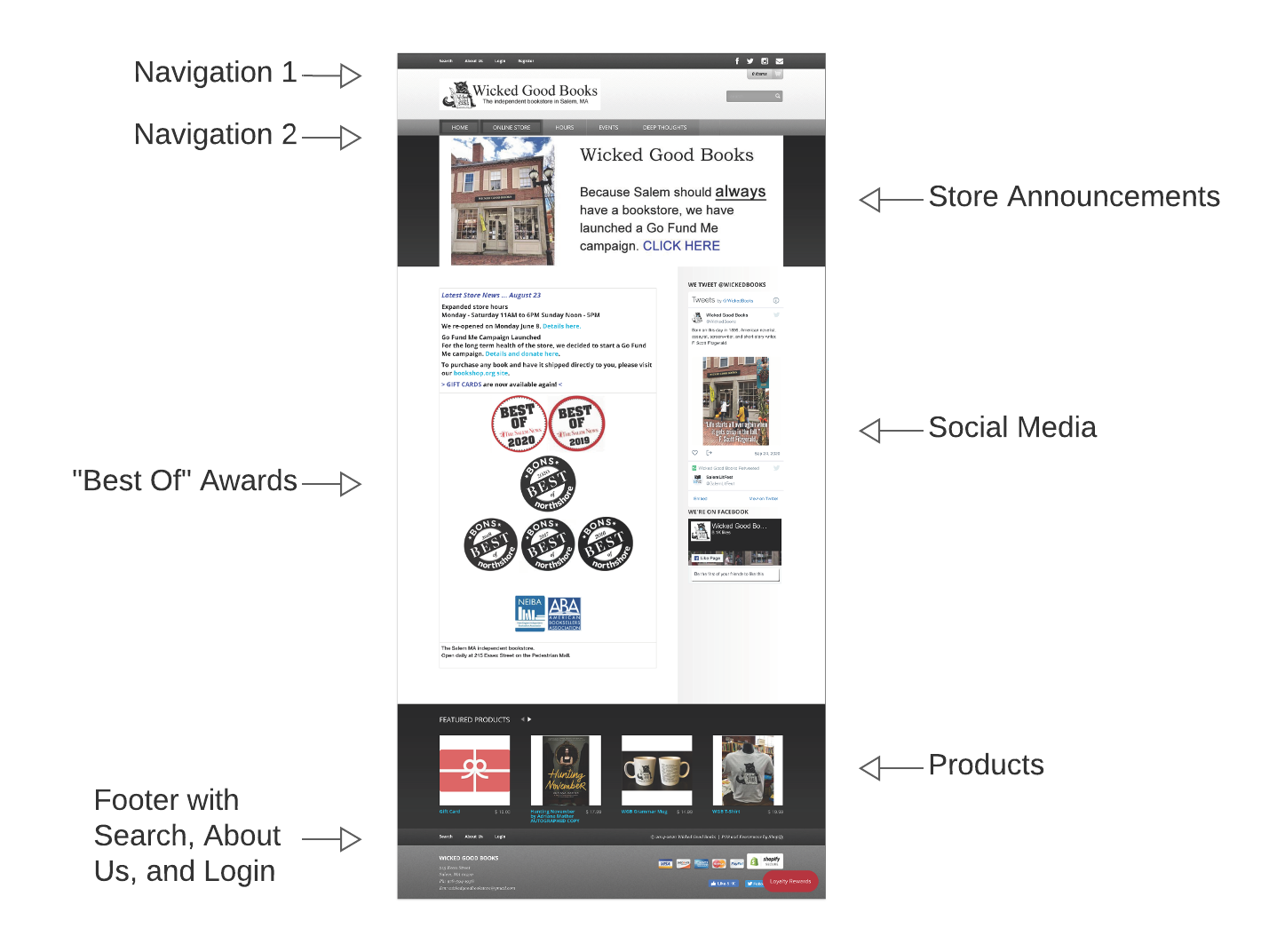
WGB shows a lot of products on their niche market and brand, but they do not seem to highlight their ability to sell books online. Their homepage content leans toward sharing store updates, showcasing social media involvements and posts, and communicating upcoming events.
As a user, I may be more interested in how I can purchase books versus learning about the store, but as a local store, they may value people knowing about their one of-a-kind-shop and community versus selling books.
Current Navigation
The "Online Store" navigation prioritizes WGB products and their niche items first and the majority of their books, under the "All Products" label, last. So, the site's navigation could be better organized and the site could better highlight WGB's ability to sell books online.
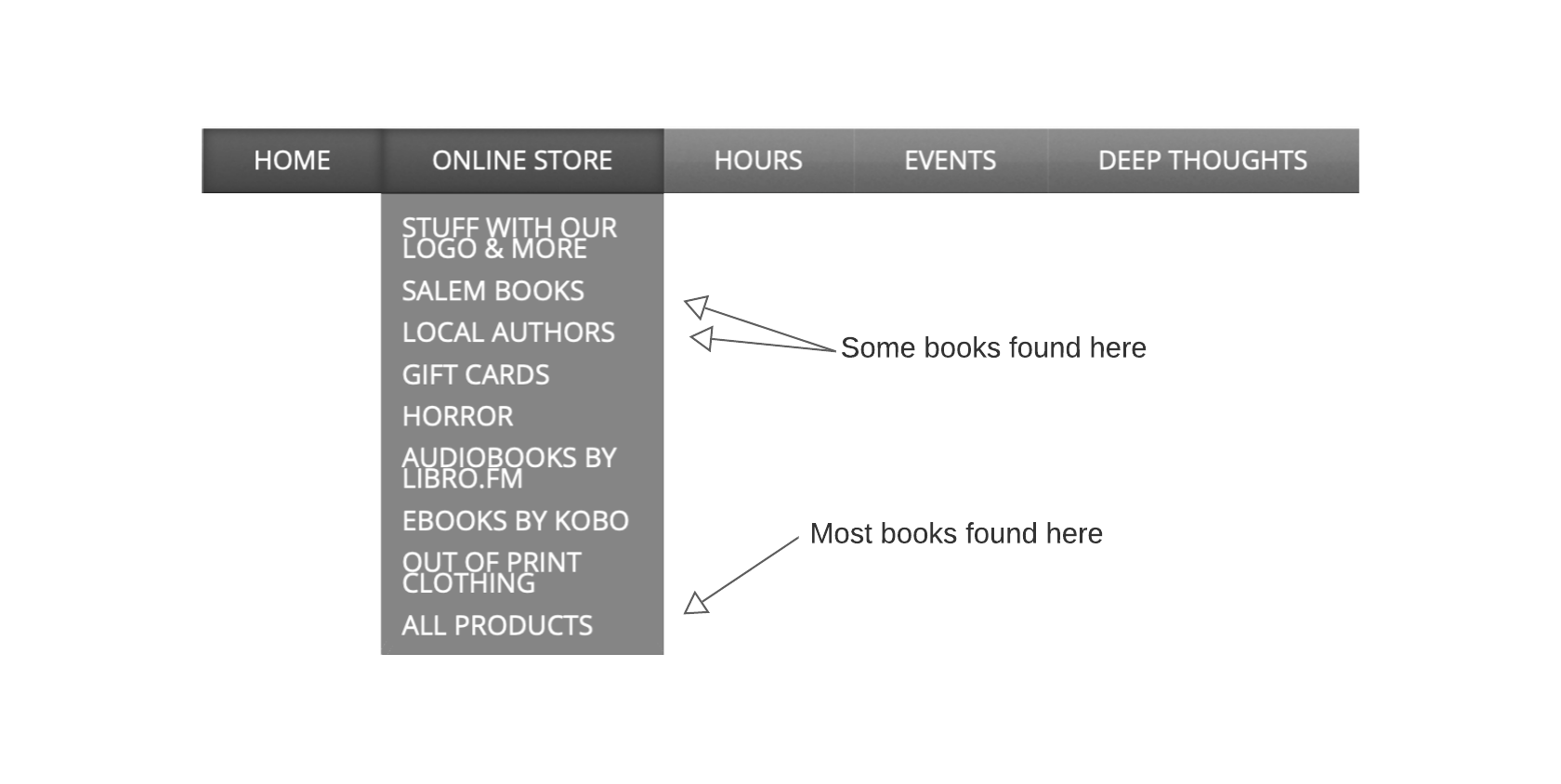
“All Products” contains the most inventory of books but it is listed last.
Competitive and Comparative Analysis
Next, I compared WGB to other stores and websites. Barnes & Noble and 2 local bookstores, Pages and Books Inc., were the first sites I looked at to compare how they organized their navigation and represented their store with visuals and site layout. I also researched the National History Museum to see how they presented their navigation for museum visits, educational resources, and exhibit information, because WGB has a focus on their building's history in Salem too.
Local Bookstore
National Bookstore

History Museum

Local Bookstore
Next Stop, User Research
To narrow in on how to best design for both the user and WGB, I asked about user perceptions on brand identity, views on community and connection with local stores, online shopping and book preferences, and their interest in knowing about the history of unique places. I interviewed local shoppers, bookstore enthusiasts, and online buyers to learn more about what they would value in a site like WGB.
Summed up into themes, the user' s positive experience of local shops prioritize:
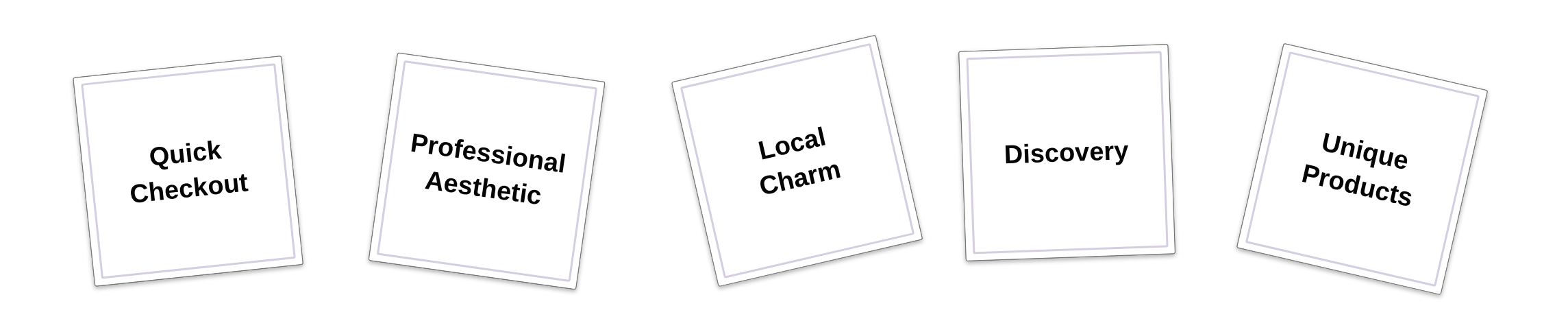
Affinity Map Insights
These themes were synthesized from user responses and from affinity map groups.
Users care about:
* Ethics and ethos of smaller businesses
* Quick and convenient checkout process like Amazon
* Connection with people
* Face-to-face interactions
* Exploration of interesting places and items
* Learning about the history of places - if they have the time to
* Discovery of unique and interesting products
* Experience of exploring a bookstore in person
* Websites that are safe, help find what you want, and are easy to navigate
These insights show how user’s value the connection and charm of a local bookstore in their interactions but want the effectiveness and conventionality of a site like Amazon when they interact with a local store’s website.
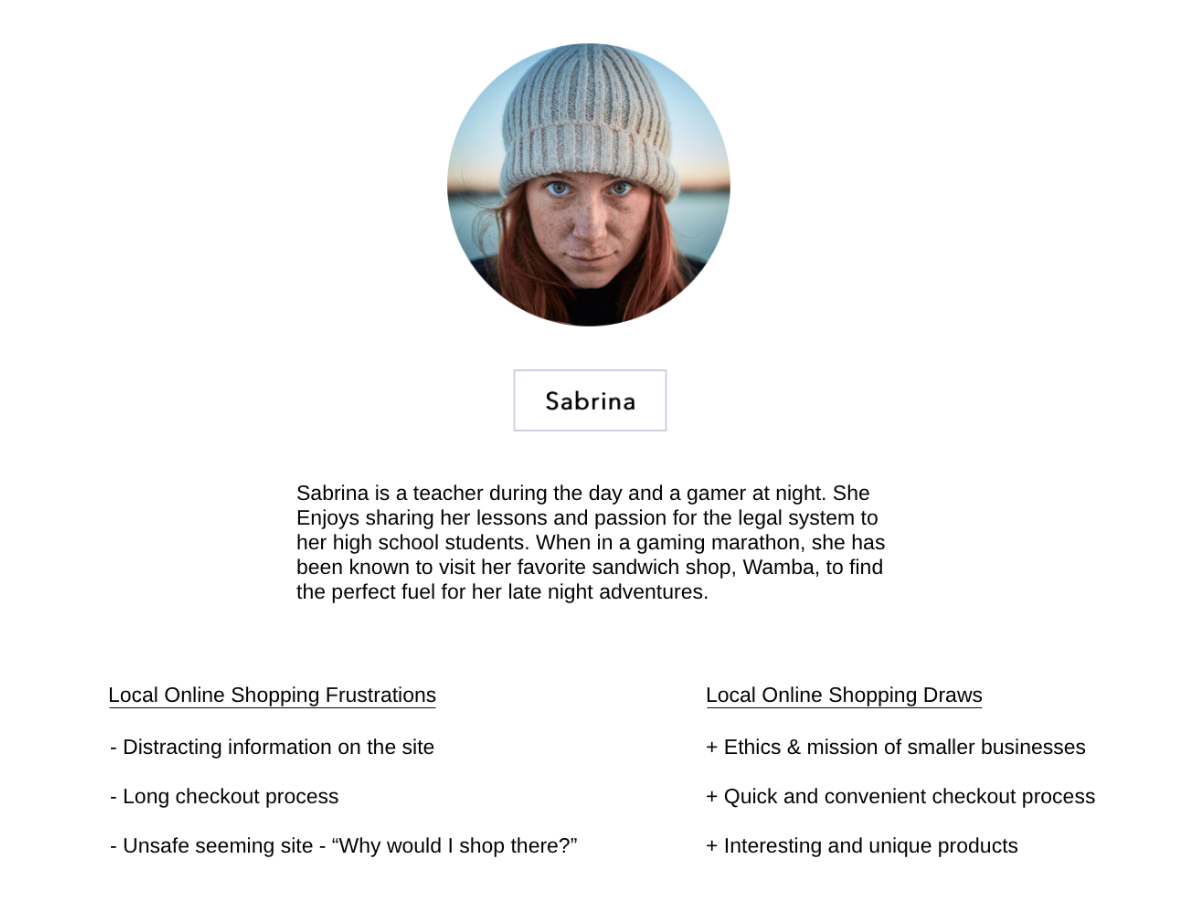
Persona
With this user feedback, the primary persona for this website redesign was created.
Journey Map
Sabrina travels through the WGB site to buy a book, and along the way, she interacts with products, like autographed books, forms, such as billing and shipping, and processes, such as choosing a book to purchase and moving through the checkout phase of her shopping experience.
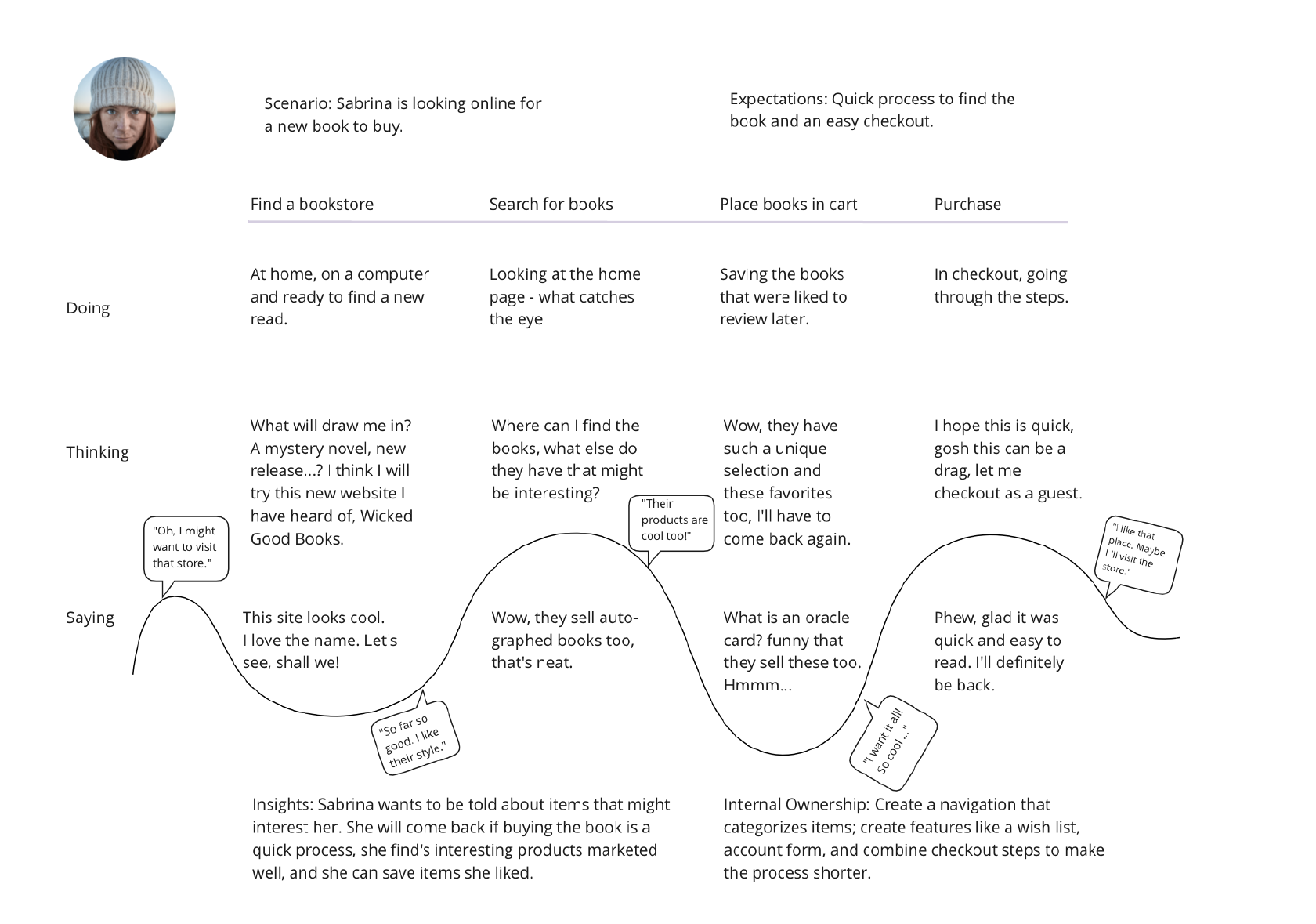
Because there are niche items, like autographed books, select novels, and oracle cards, Sabrina may want to purchase more items later and save what she liked. At the time, she may have a limit to what she wants to purchase, so creating a wish list feature would add a fun interactive experience and also be a reason to visit the online store again to browse saved products and to add new one’s to her list. ⭐️
Journey Map Insight : Sabrina may find a wishlist useful in keeping track of books and other products she likes. This feature would also organize her product selection and be an incentive to visit the site again.
User Flow
A key point from Sabrina's user flow shows that as she movs through the WGB site, there is a hotspot where she may be motivated to stay online to browse products.
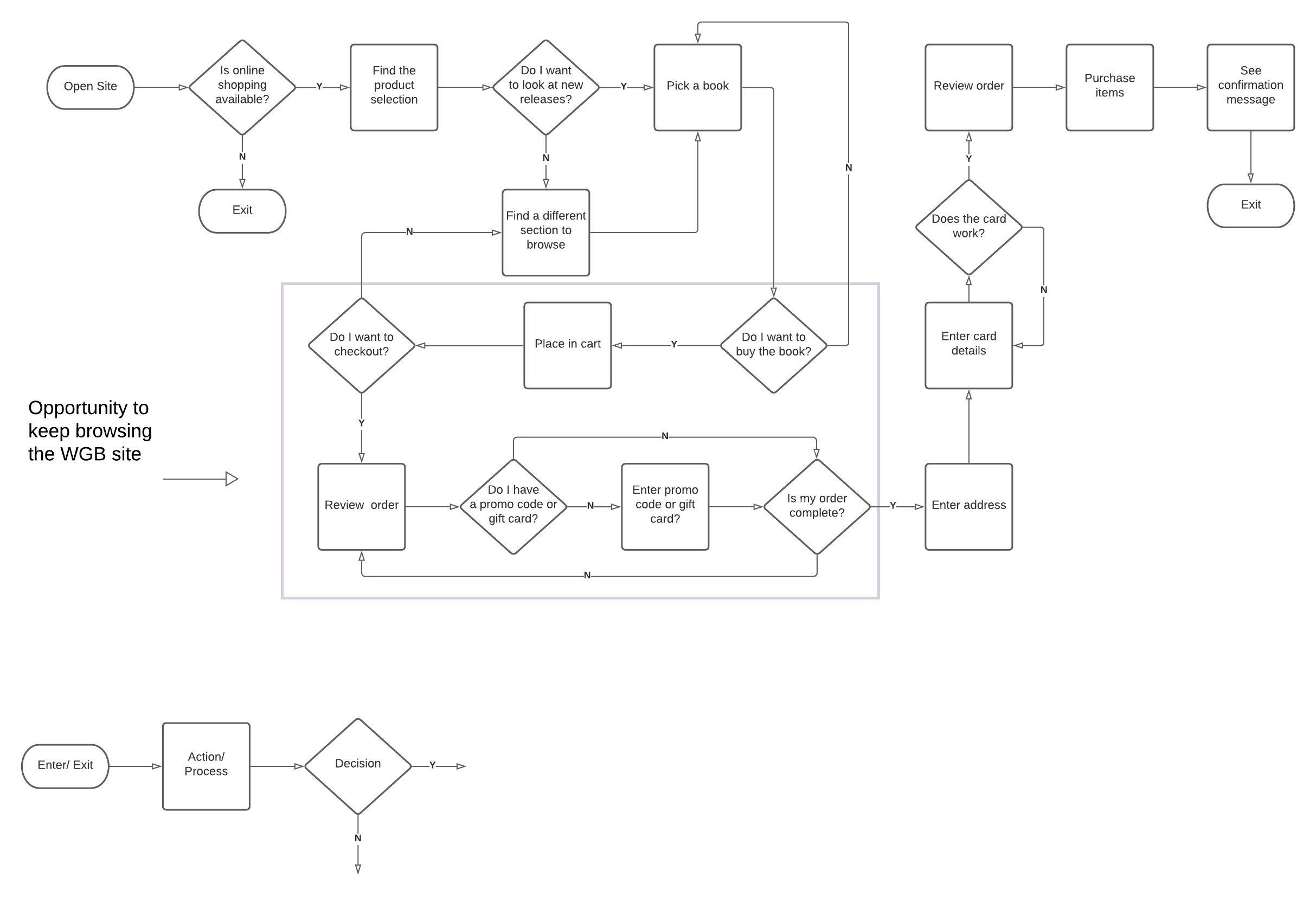
The best places to motivate Sabrina with new content is when she questions if she is ready to buy a book, checkout, and complete her order. In these situations, there is a decision that reoccurs. Should Sabrina continue to browse products and move through the online shopping flow again or should she move through the checkout process to complete her buying loop with WGB?
User Flow Insight: “Recommended Reads” and “Featured Items” may keep user’s interested and have them move back into the flow of online shopping instead of moving into the checkout phase.
Game Plan
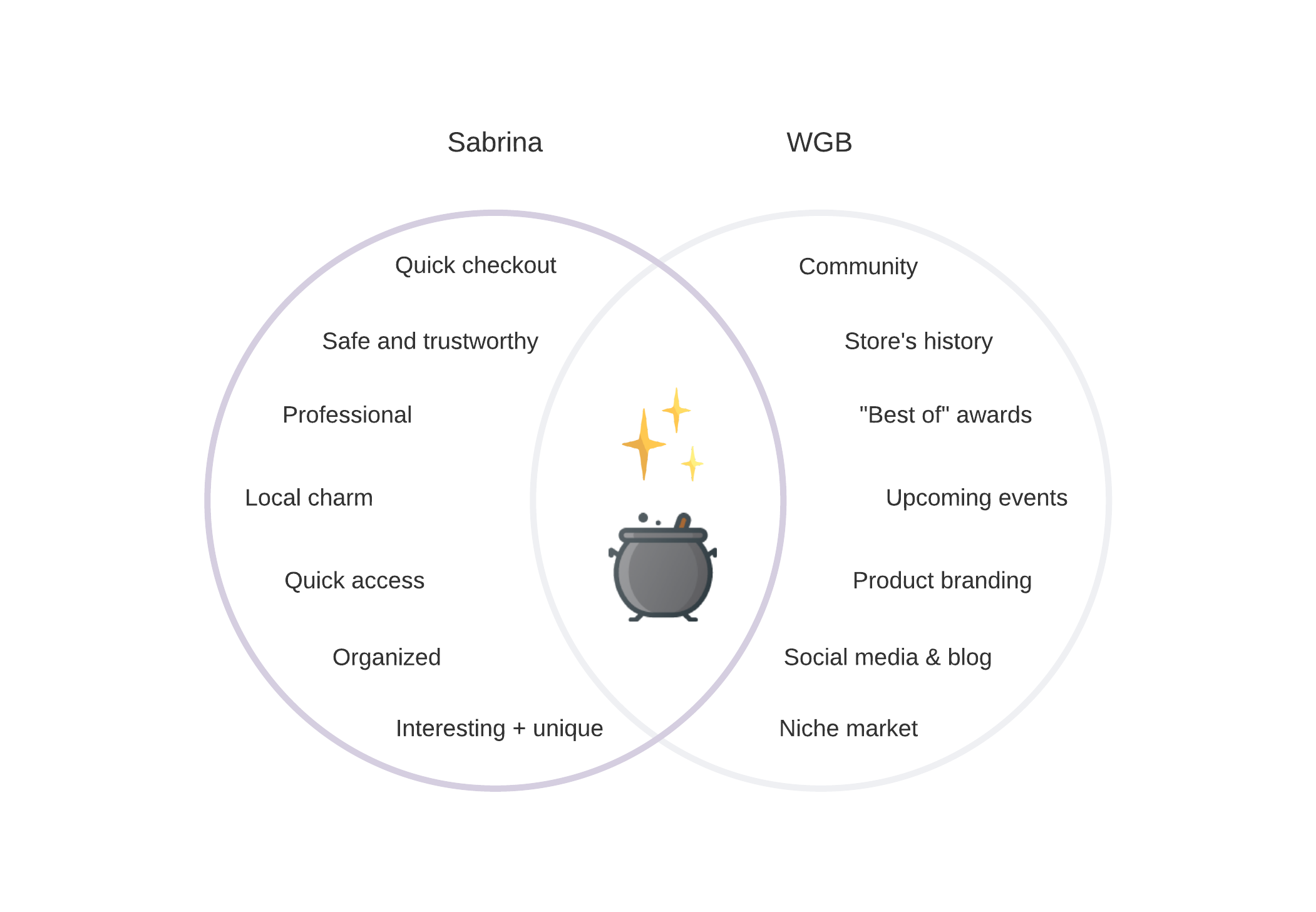
Sabrina needs online book shopping to be safe, interesting, and easy to navigate, because she wants to enjoy and support her local bookstore online just as much as she does in person.
Wicked Good Bookstore wants to share their local and unique identity while engaging users enough to purchase products, so that they can reach customers through their niche market.
What Sabrina and WGB want:
How to Do It:
+ Get rid of unnecessary content to highlight the site's selling points
+ Reorganize and update pages to reflect the "Best of" store awards
+ Add visuals that are appealing and attractive
+ Provide information on the store and upcoming events that hook users
+ Include a quick and seamless checkout process
+ Design a new navigation that better categorizes items
+ Recommend user-specific products throughout site exploration
+ Highlight WGB’s unique identity and products
+ Include new forms for sign-in, add to cart, billing, shipping, and checkout pages
+ Add a wishlist for WGB visitors
Important questions to solve for the redesign:
Can we make the site seamless so that users have the energy to keep looking at interesting products instead of sorting through unnecessary information?
Can we show items that users may like so that it is easier for them to decide on product choices and then move through each step of the checkout process?
Next Stop, Map Out and Sketch the Design
A clear navigation will lead you to where
you need to go and find new
discoveries along
the way.
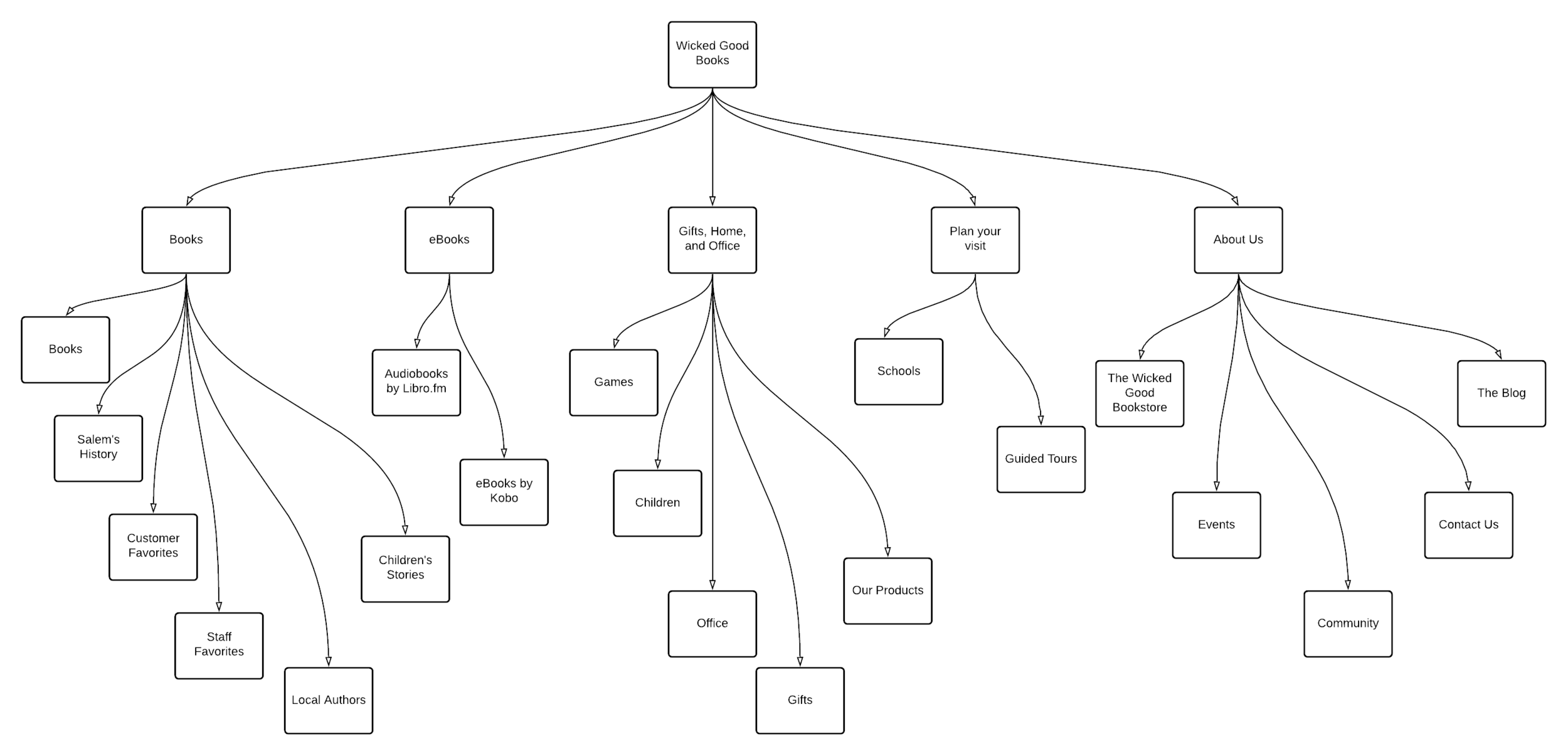
Redesigned Sitemap
New Navigation
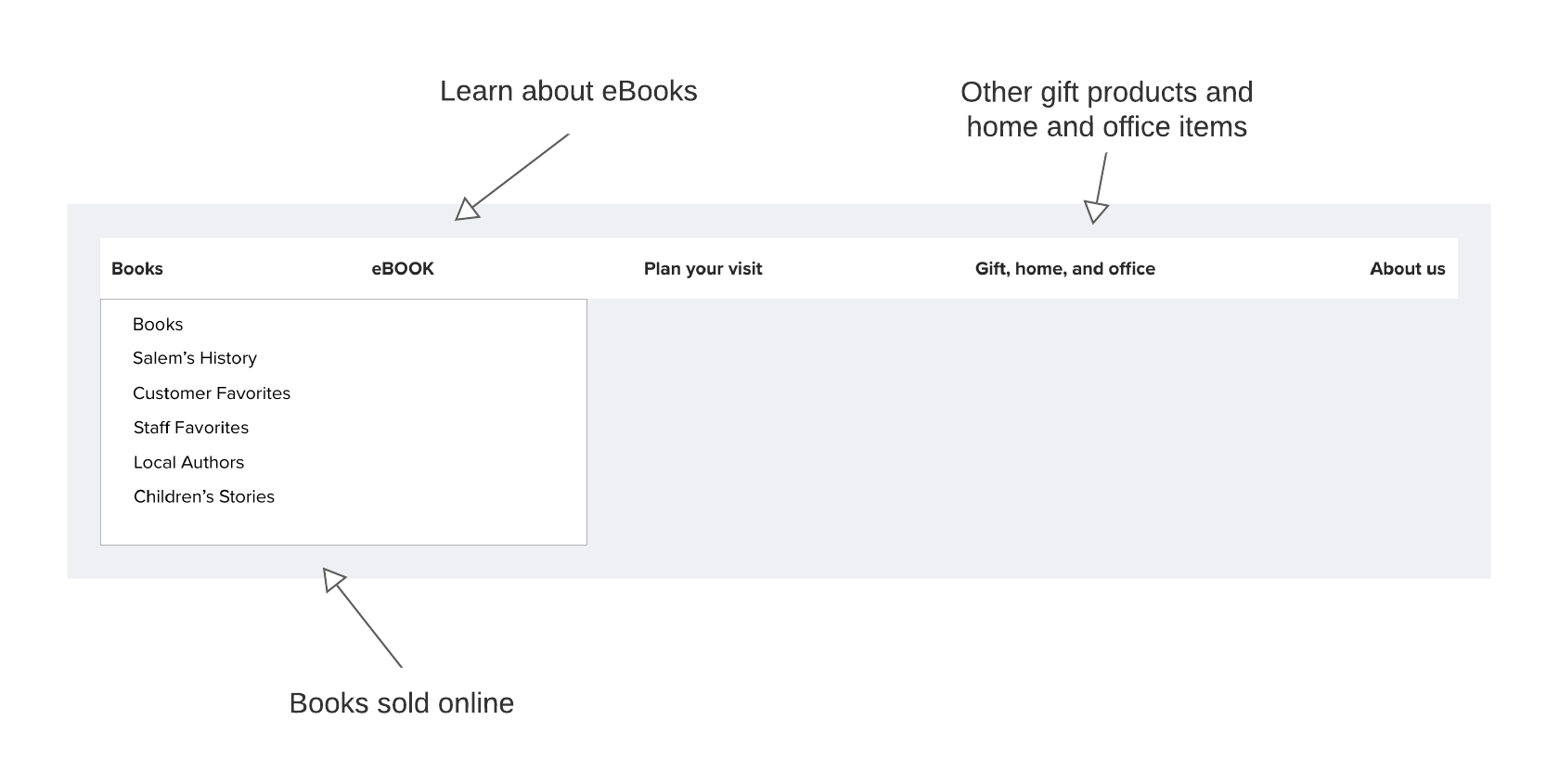
The redesigned navigation has categories that are more intuitive for users to move through. "Books" contains the different book categories, "eBook" shares information on audio and smart device reads, "Plan your visit" gives visitors information on the building and possible tours, "Gift, home, and office" contains the WGB product line and art items, and "About us" gives information on their location, hours, and blog.
Color Scheme
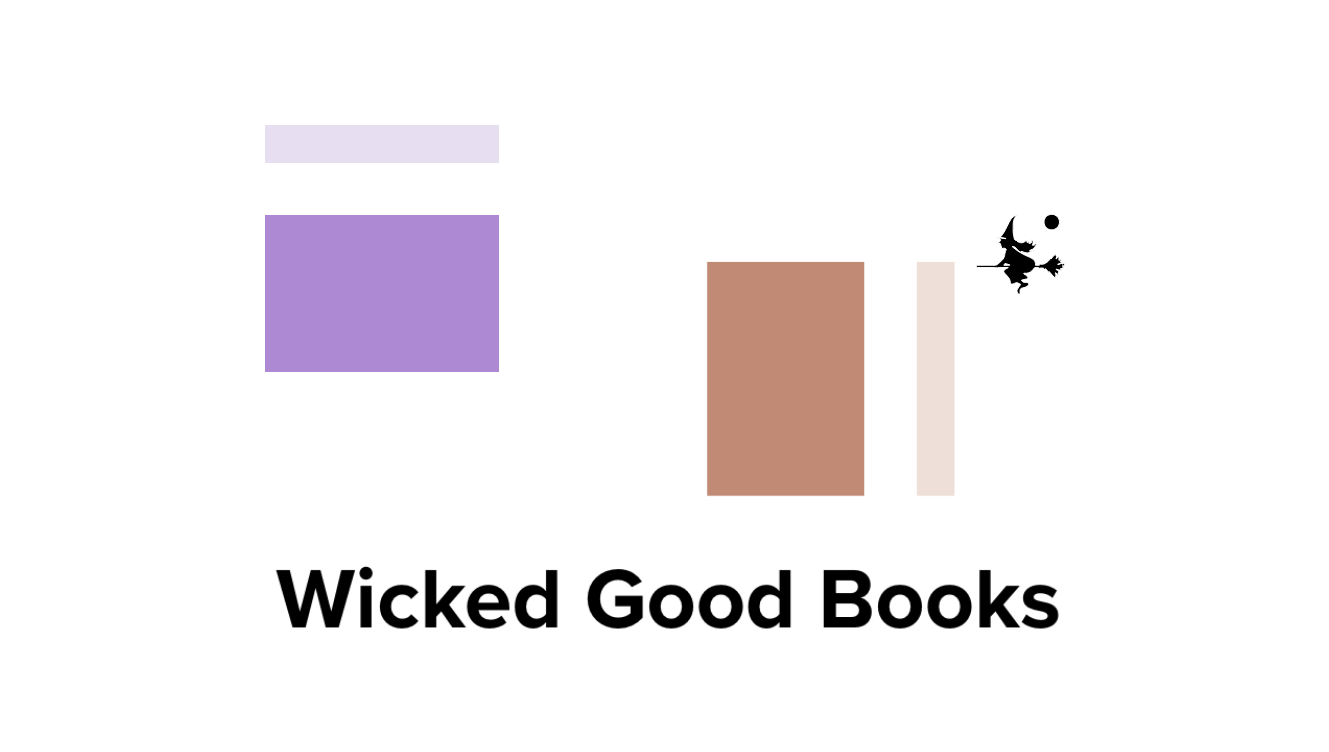
A purple announcement on the current site inspired the purple hue chosen for the redesign. A light purple color is used to convey the welcoming and whimsical nature of the store. A light brown color was picked to bring to mind a well-used library and the bookshelves, worn pages, and cozy chairs that make for a reading nook.
The colors are intended to support the local charm, more modern design, and professional feel of the new site. The main site is shown in shades of black and white, so splashes of color will bring more character to the local store site and help to break up the content on the different pages.
Brown : Warmer tones suggest a well-used and well-loved bookstore
Purple : Pops of purple add to the store’s charm and emphasize WGB’s niche market
Wireframe Build
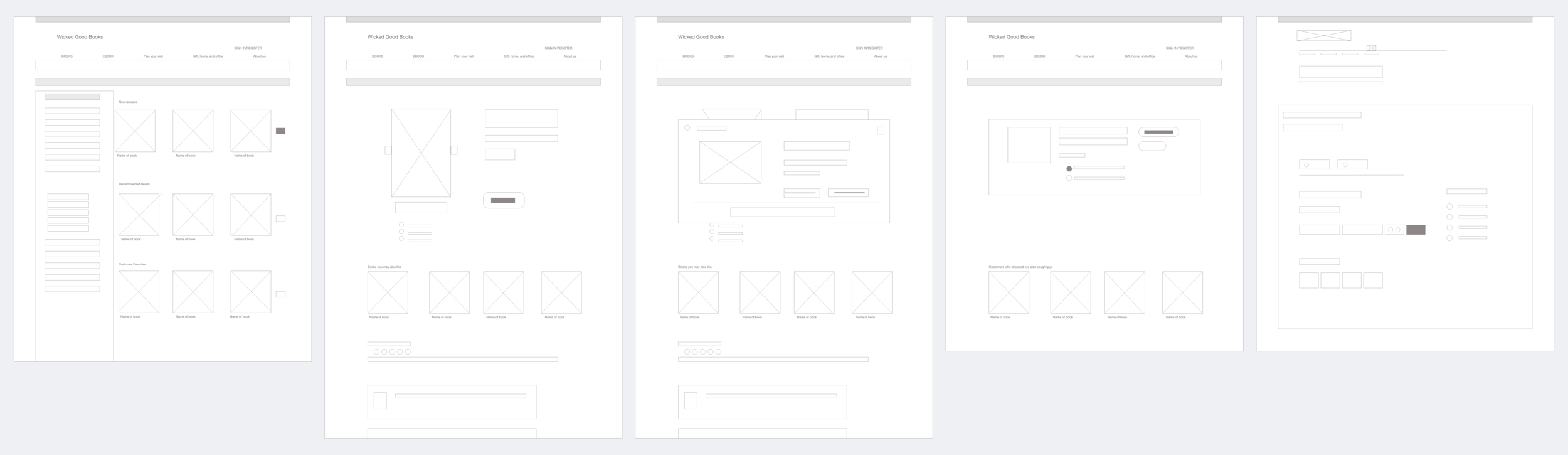
The user, Sabrina, moves through the site with the intention of purchasing a book. In this wireframe build, she views book options, decides what to add to the cart, and moves through the checkout process.
Along the way, the user may be drawn to the wishlist, stumble upon a sold out book, and decide to learn more about the store's location and history. 🐱
Final Wireframes
🤚 Stop! User Feedback Pitstop
User feedback fueled the changes in visuals and page layouts from the original mid-fidelity mock-up to the hi-fidelity mockup. A user mentioned that Netflix and Nike websites have page layouts and product images that look clean and are easy to browse. This critique gave me new material to draw from, which led to adjustments in the format of pages with more space between content and in the placement and sizing of items with larger product images.
Changed Design from User Feedback
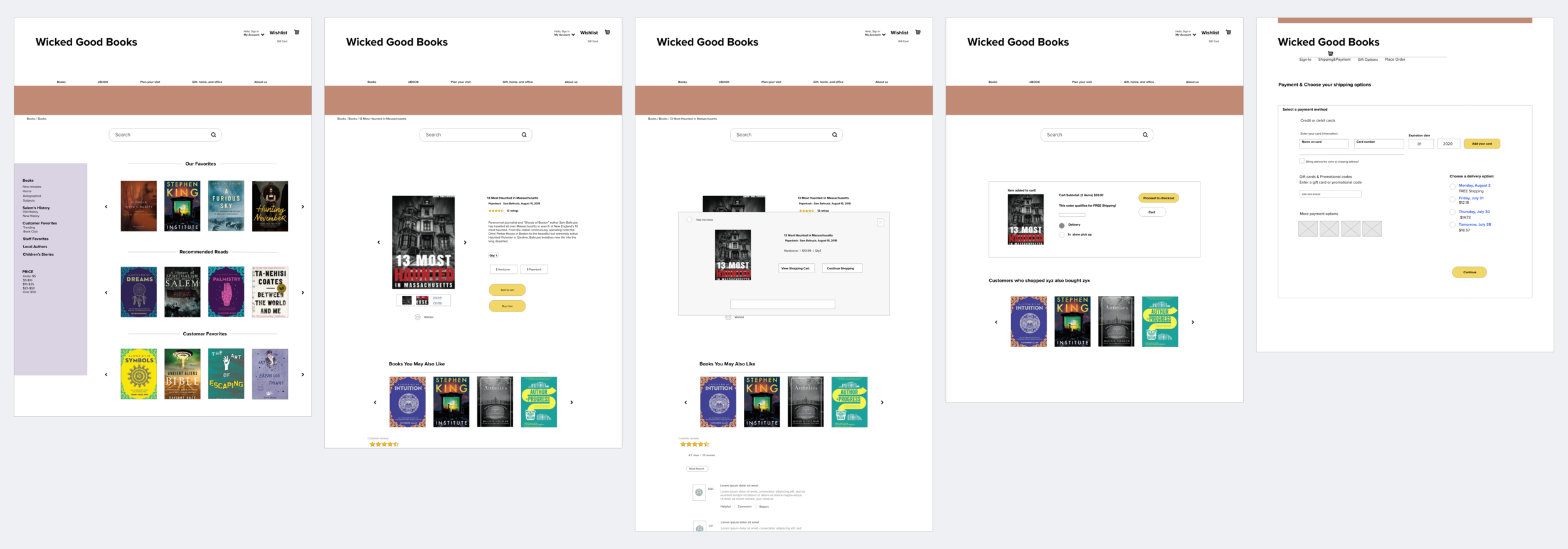
Hi-Fi Mock-up Pages
22 screens show the checkout process and additional pages that aim to solve for WGB and Sabrina’s goals. There is a more fluid and sequential process for completing tasks with a more modern and charming look.
Sign-In Page
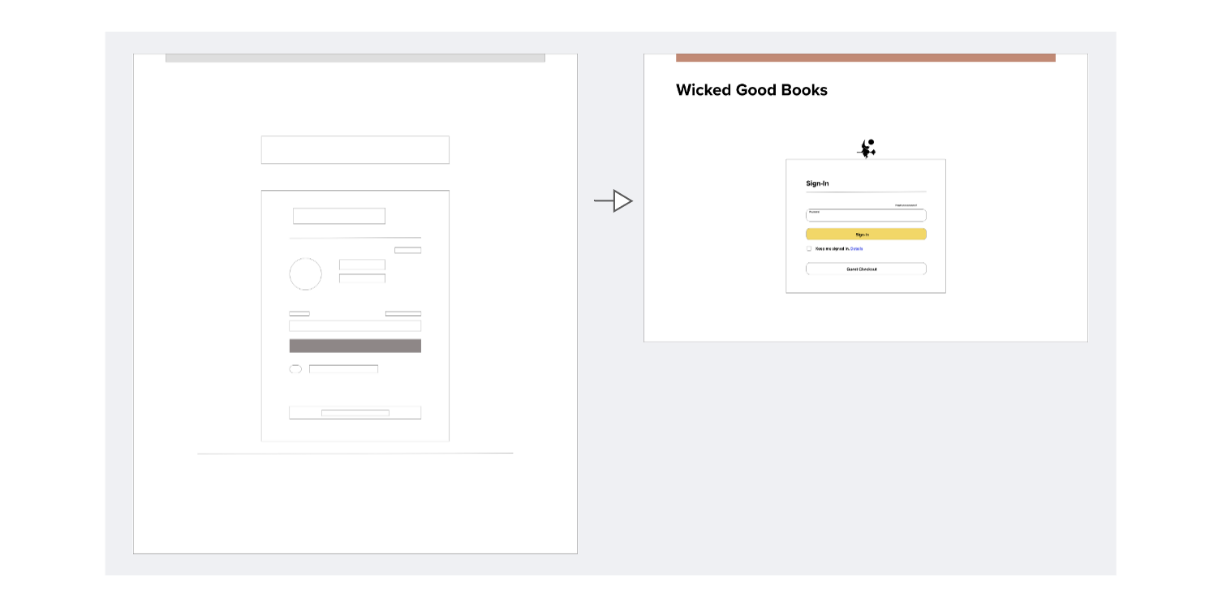
The WGB redesign draws on the intuitive checkout process with Amazon. User interviews highlighted the speedy checkout, order confirmation notification, and option to save payment and shipping details. This is the framework for the WGB sign-in page and checkout process, an experience customers find natural to move through, but adapted for WGB users. The WGB sign-in page gives the option to checkout as a guest or sign in to an account, and it is individualized to the local store with a witch icon and their purple and brown color scheme.
Wishlist Page
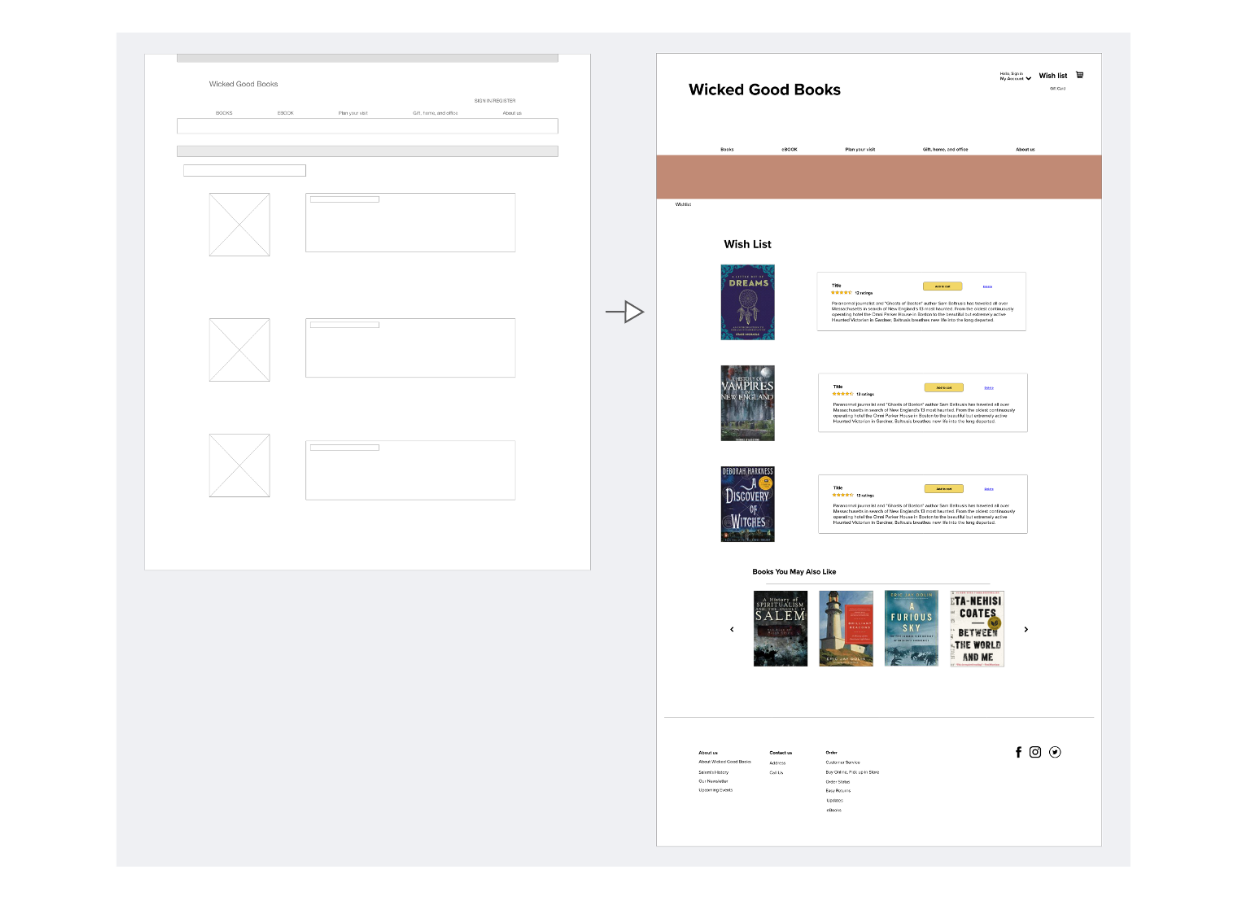
There is an option to add items to a wish list at the upper right corner of the WGB website. Because they sell noteworthy items, a visitor may wish to purchase more than they had intended. Before or after checkout, they can save items to the list, and this may incentivize them to create a WGB account, return as a WGB customer, and front load purchases they intend to make in the future. Additionally, it shows recommended reads based off a customer’s browsing history and it is meant to be a fun way for visitors to keep interacting with the WGB website.
404/ Not Found Page
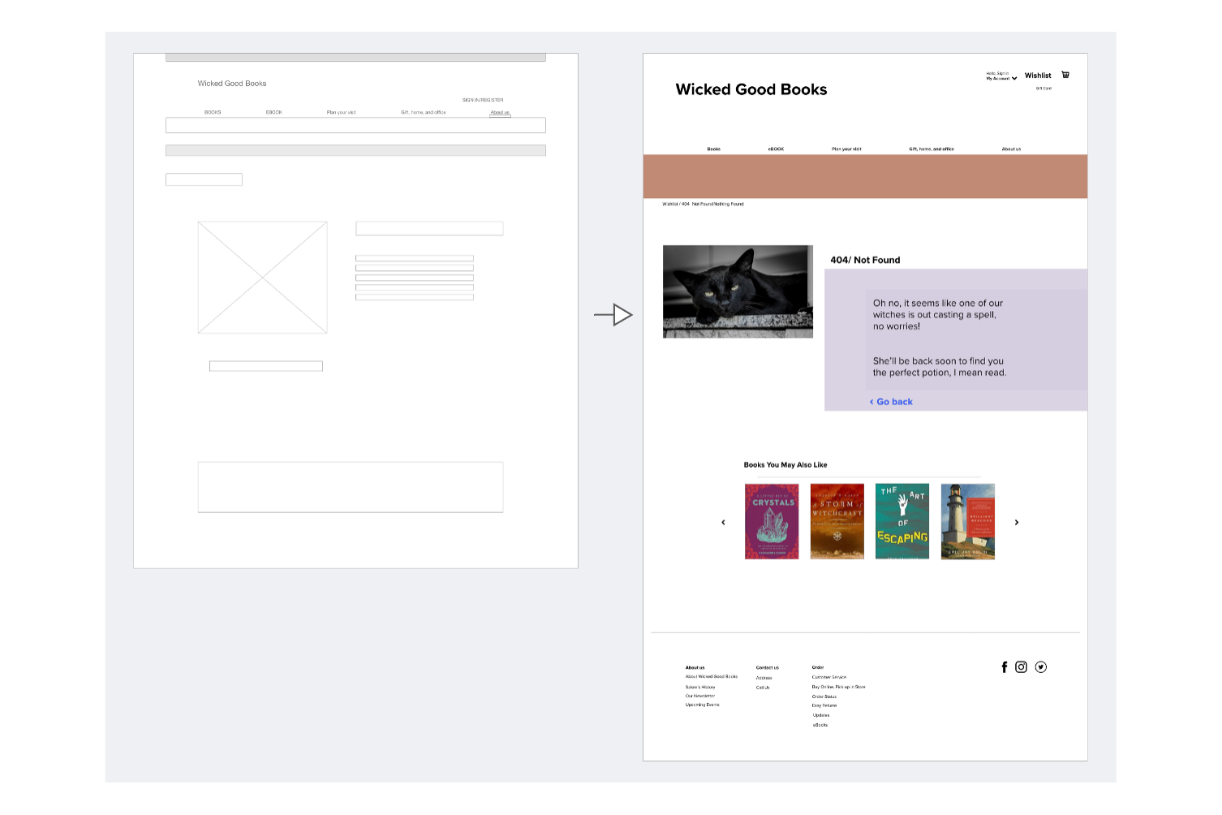
Oh, no! An alert will inform visitors of a sold out product or unavailable page. Content inventory and site research showed many products were sold out or had 404/ Not Found pages on the original WGB site. To design for these instances, a personalized page was created to alleviate surprise with the local cat’s message and to redirect users back to their previous page with the breadcrumb, “Wishlist”, or with the back tab. There is also a third choice, where a user can browse available books suggested in “Books You May Also Like”, underneath the initial 404/ Not Found message.
Bonus Pages! Further Developments
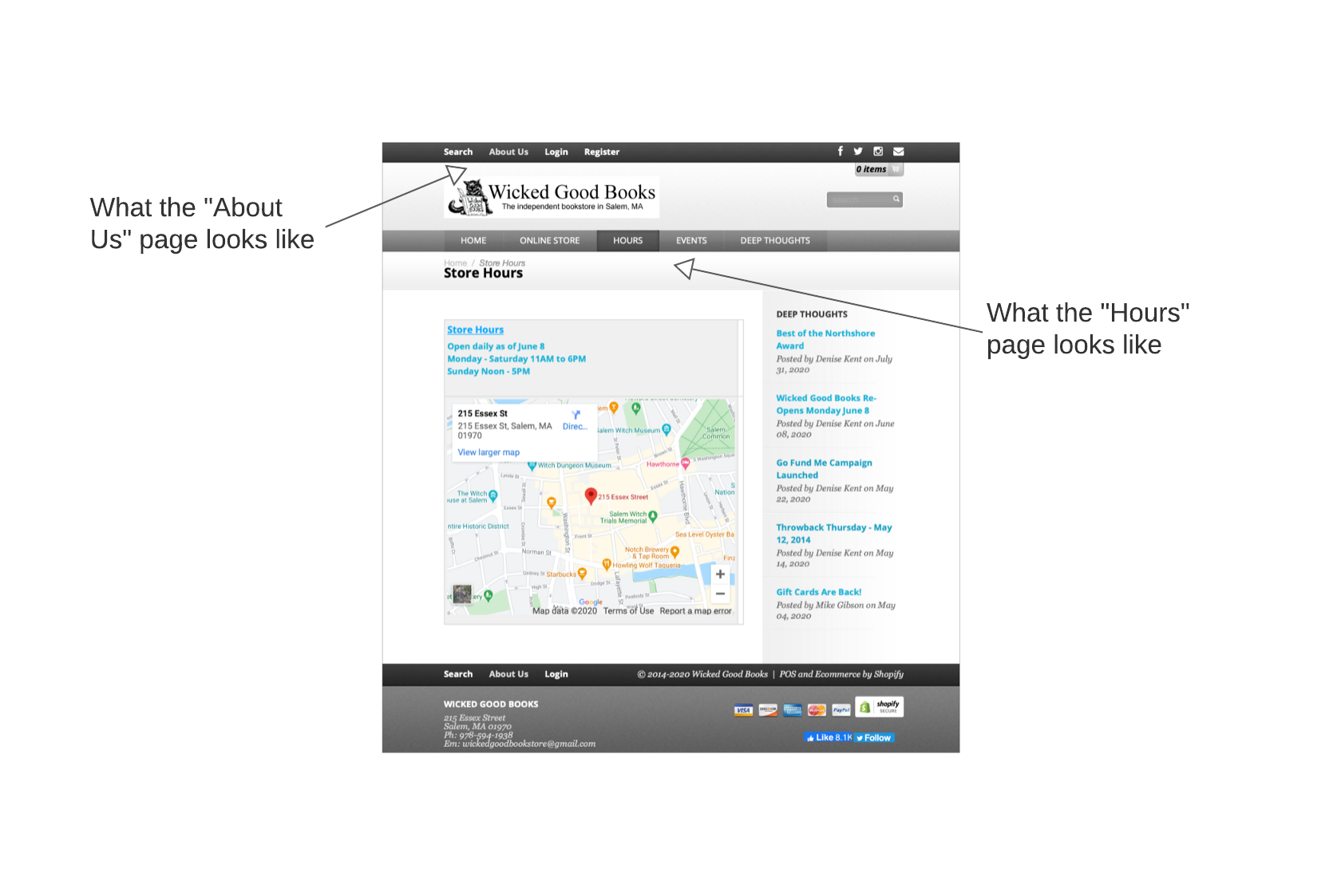
For captivated and curious readers, there are new “About us” and “Contact” pages. The original WGB “About Us” page was the same as the “Hours” page. It was confusing to have 2 different navigation titles leading to the same page, so I created 2 new pages, with their own titles, to show the distinction between the store’s contact information and WGB’s background.
Original “About Us” and “Hours” Page
Redesign with an “About us” and “Contact” Page
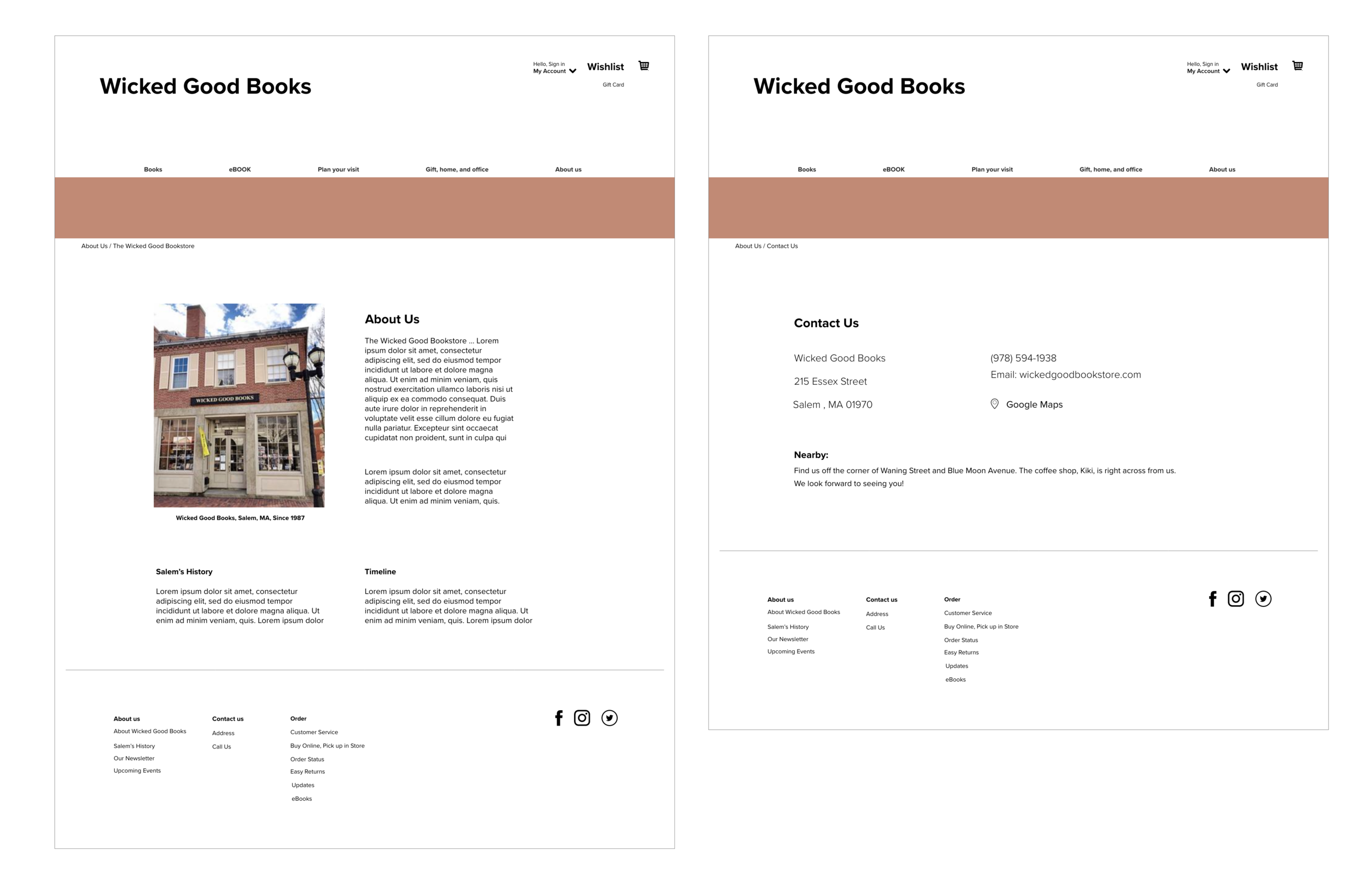
The redesigned “About us” page is ready to share a description about the local store, expound on the store’s connection to Salem, and present a timeline with WGB’s history of events. A picture of the storefront with the year it opened is shown as well, and the “Best of” awards can be presented under “About Us” or “Timeline”. A clearer navigation title and specific page content represents who WGB is versus where they are located. This page brings more context of their identity, that was displayed on their original homepage, into a section that readers can review at their own leisure.
The redesigned "Contact" page succinctly informs visitors where to locate the store with WGB’s address, a google map, and nearby directions. The google map icon and link replace the map that was shown on the original WGB “Hours” page allowing for more information to be shown and for people to quickly identify if they want to locate the store, call or email WGB, or check store hours. The new “Contact” navigation broadens what is offered on this page compared to the original “Hours” navigation. Informal directions speak to the local community and personable tone of WGB.
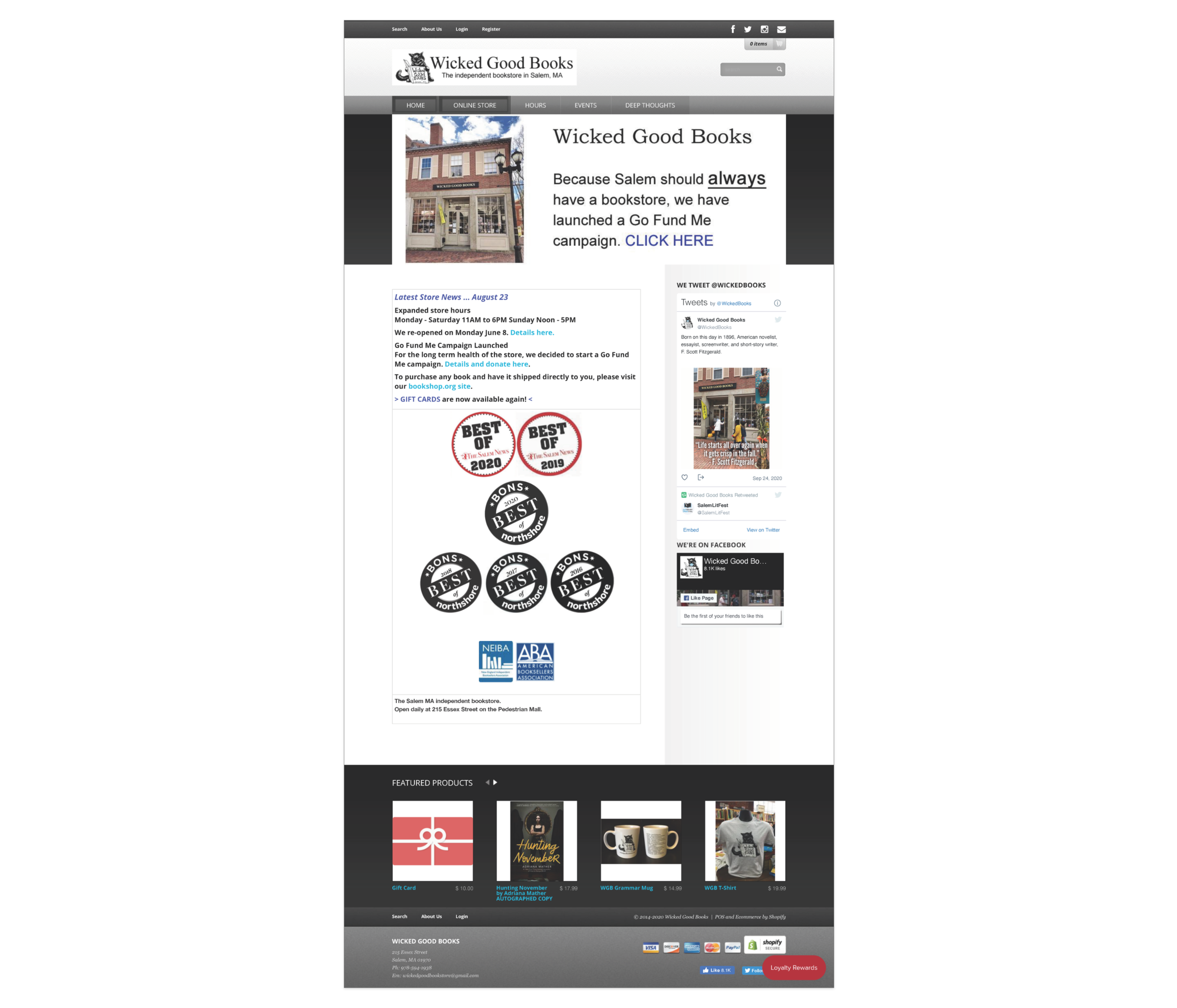
Homepage Before + After
The redesigned homepage translates the values of WGB, identity, community, and history, into a more modern look and new hierarchy of information, so visitors connect to who WGB is while having a seamless online shopping experience. Users are now able to view upcoming store events, favorite and new book releases, WGB history, store reading lists, social media accounts, blog posts, and a newsletter sign-up.
Current Site
Redesign
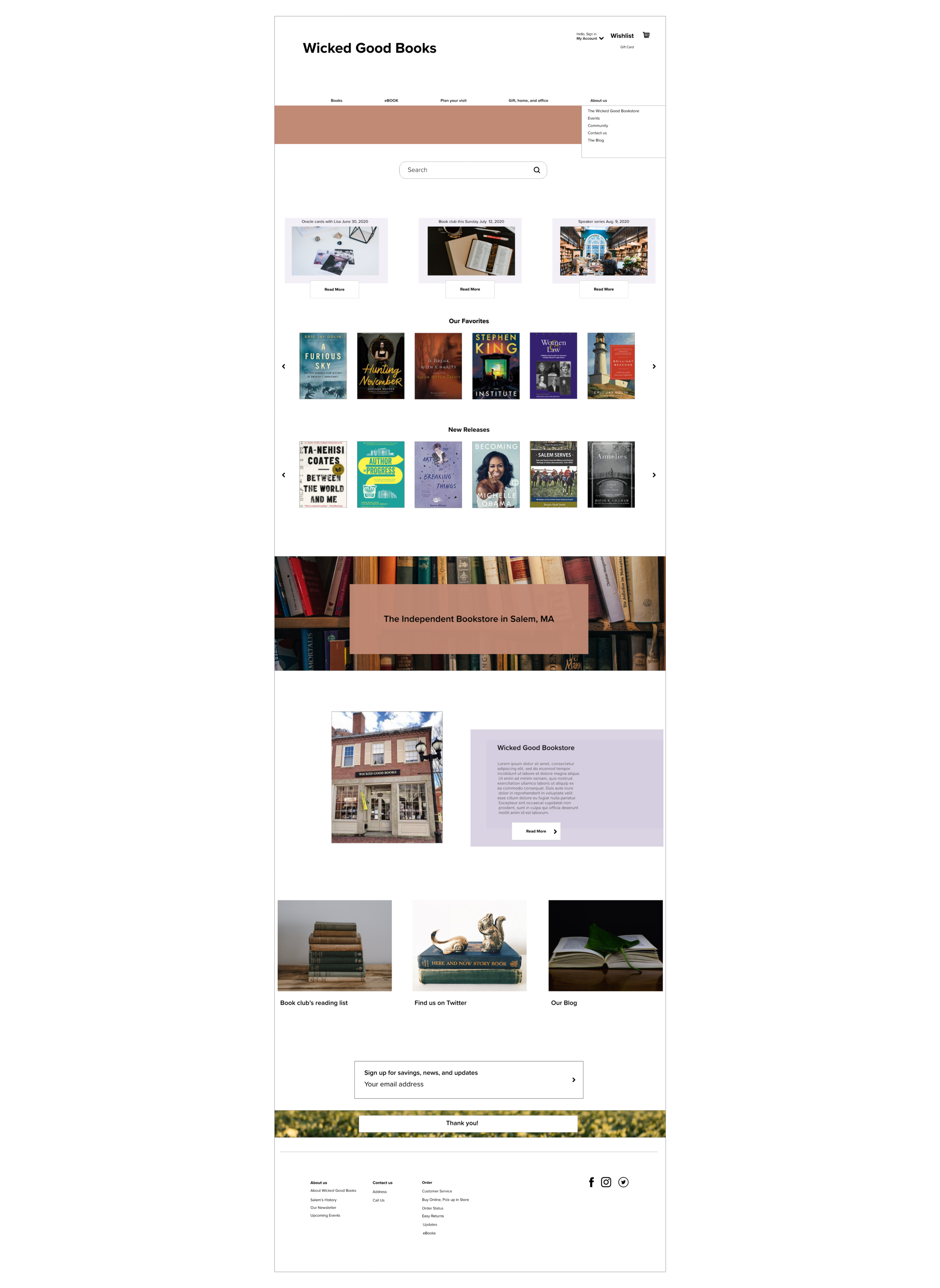
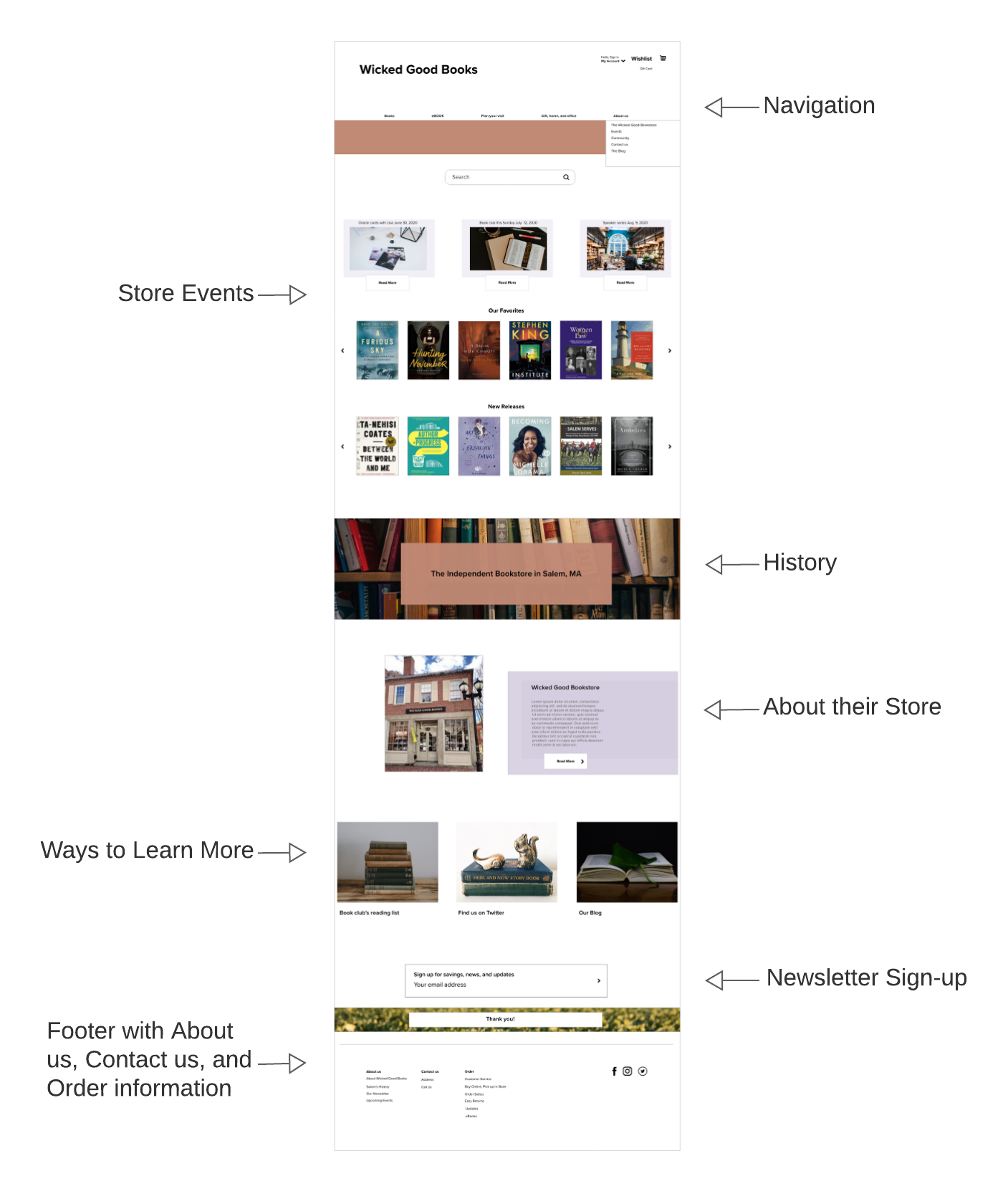
Redesigned Homepage
New emphasis for the homepage includes:
+ Users have the ability to view upcoming store events, favorite new book releases,
+ Online book buying and exploration of a niche market is more accessible, while users are also drawn into the story, local community feel, and history of WGB.
+ User can choose to explore the site looking for books or to browse an array of other WGB information.
+ Enjoy the local charm of the store and purchase books.
+ Enjoy the local charm of the store and purchase books.
+ Enjoy the local charm of the store and purchase books.
After taking in the WGB homepage, people can learn more about WGB and their happenings by exploring the myriad opportunities to connect with visitors. In the case that they are looking for products by title or author, they can use the search bar implemented into the top of the homepage or they can utilize the newly organized navigation to move to the page they wish to explore.
Prototype
After taking in the WGB homepage, people can learn more about WGB and their happenings by exploring the myriad opportunities to connect with visitors. In the case that they are looking for products by title or author, they can use the search bar implemented into the top of the homepage or they can utilize the newly organized navigation to move to the page they wish to explore. The mockup-up goes through a user action of purchasing a book and moving to other pages as a new user. Through this perspective, the redesign integrates user and store goals into a positive flow. 💫
Reflection and Next Steps
In-depth usability testing is the next step to gather other people's perspectives on the function of the site and to see if the design vision matches their experience of it. From this, adjustments will be tailored to their feedback and responses will show how the original site compares to the new one. A goal is to look into a smart search and turbo checkout process to improve people's book search and checkout experience.